MagnetFX Broker Deposit & Withdrawal Guide
How to submit a deposit or withdrawal request with the broker MagnetFX.
Deposits
- Visit the page https://cabinet.magnetfx.co.id/, please log in using the email and password you registered with.
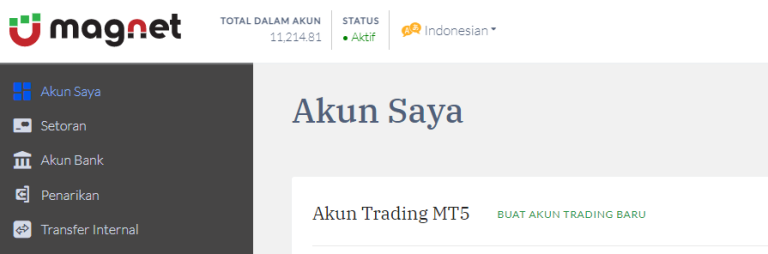
- Select the Deposit menu to make an initial deposit or add funds to your trading account.
- Select the bank to be used for the transfer, choose the destination trading account, enter your deposit amount in USD, and upload your proof of deposit.
- Click the “Submit” button, and rest assured—we will process your addition request shortly.
Instant Top-Up
For Bank BCA customers specifically, the top-up process will be much faster and free of charge, as our segregated account is held with Bank BCA.
If you already have an account, you can use the instant top-up feature by entering your account number in the transfer reference or description field. For example, if you want to top up account number 1234567:
- Example of a correct instant top-up: 1234567
- Example of an incorrect instant top-up: top-up account 1234567
Withdrawal
- Visit the page https://cabinet.magnetfx.co.id/, please log in using the email and password you registered with.
- Select the Withdrawal menu to withdraw funds from your trading account.
- Select the bank to be used for receiving funds, choose the trading account to withdraw from, and enter the withdrawal amount in USD.
- Click the “Submit” button, and rest assured we will process your withdrawal request shortly.
- Select the Withdrawal menu to withdraw funds from your trading account.
- Select the bank to receive the funds, choose the trading account to withdraw from, and enter the withdrawal amount in USD.
- Click the “Submit” button, and rest assured—we will process your withdrawal request shortly.
Bank Offline Schedule [Important]
Deposit and withdrawal transactions will take longer during local bank offline hours. Below are the approximate offline times for several banks:
BCA:Monday – Friday: 21:00 – 01:00 WIB
Saturday – Sunday: 23:00 – 01:00 WIB
Mandiri :
Sunday – Friday: 23:00 – 04:00 WIB
Saturday: 22:00 – 04:00 WIB
BRI : 23:00 – 06:00 WIB
BNI : 21:00 – 04:00 WIB
Deposit and withdrawal terms during bank offline hours
When the bank system is offline, the new margin will only be entered once the status at the bank is... good fund / confirm.
If an investor makes a deposit, top-up, or withdrawal while the bank is offline, they will most likely have to wait until the bank's offline status ends. Once the offline period is over, the funds will be processed automatically.